
Review
Akeeba Backup for Joomla Review: Is the Free Core Version Still Enough in 2026?
Quick Answer
Akeeba Backup Core is a free, open-source, one-click backup extension for Joomla that has been the community's default backup tool since 2006. It covers full-site backups, multiple archive formats, and manual restoration through the companion Kickstart script. Akeeba Backup Professional (starting at €50 for the first year) adds scheduled/automated backups, cloud storage destinations like Amazon S3 and Dropbox, and encrypted JPS archives — features worth paying for once you manage more than one site or want backups running unattended.
Editor's take: For a single hobby or small business site where you're comfortable clicking "Backup Now" before major updates, Core is genuinely enough — it's not a stripped-down demo, it's a complete manual backup and restore workflow. If you manage client sites, need backups to run on a schedule without you remembering, or want offsite cloud storage, Professional pays for itself the first time a server dies.
This review covers Akeeba Backup for Joomla version 10.3.x (current as of July 2026), compatible with Joomla 4.4 through 6.1 and PHP 7.4 through 8.5. We compare the free Core edition against the paid Professional subscription, walk through the features that actually matter day-to-day, and summarize what real users report after using it.
What Is Akeeba Backup?
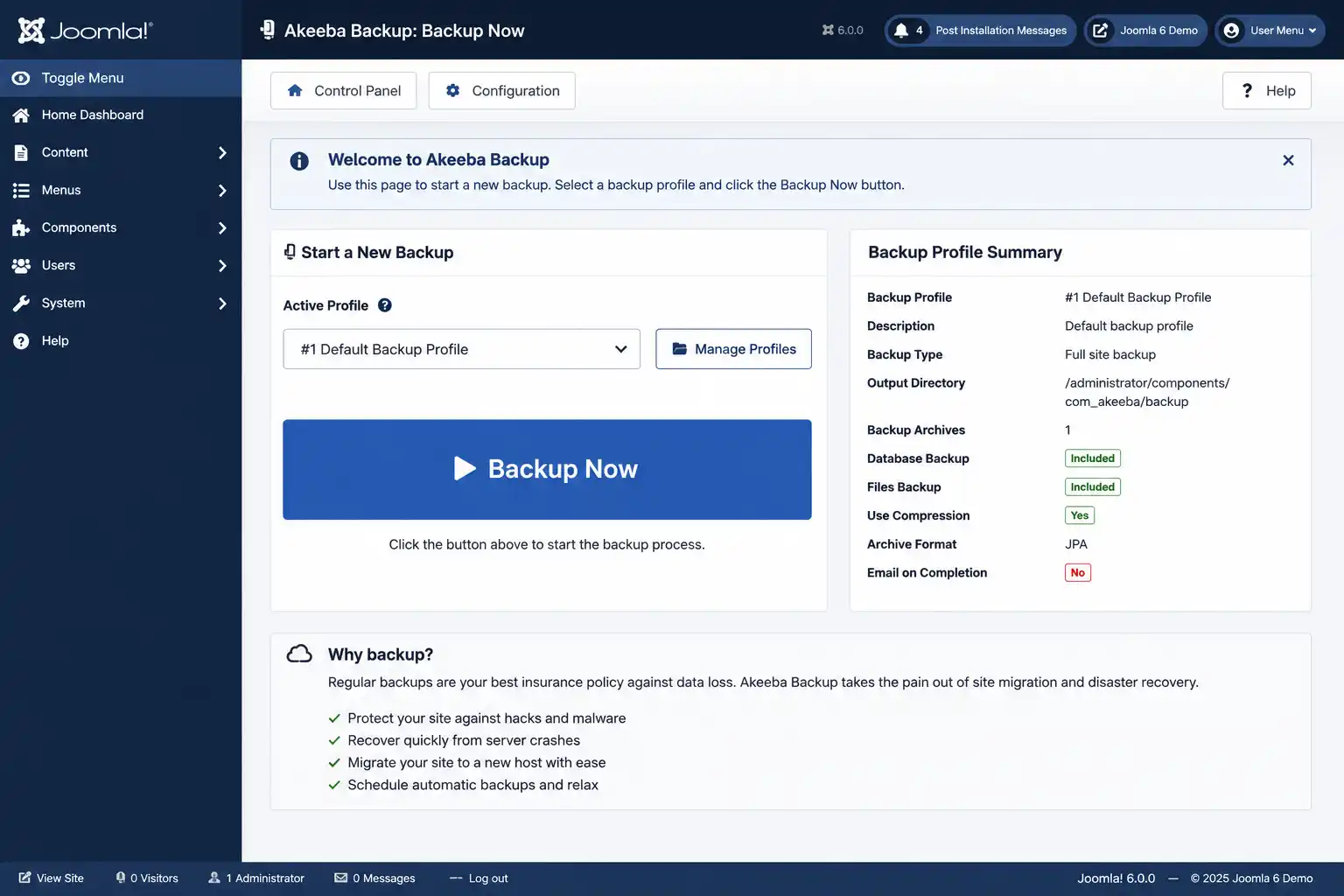
Akeeba Backup Core is the most widely used open-source backup component for the Joomla CMS. It creates a single self-contained archive of your entire site — files, database, and a restoration script — so the backup can be restored on virtually any Joomla-capable server, not just the one it was taken from. Beyond disaster recovery, this makes it a common tool for migrating sites between hosts or cloning a live site to a staging environment.
The extension has been in continuous development since 2006 and is developed by Akeeba Ltd, a UK-based company that also builds Admin Tools (security hardening) and several other Joomla and WordPress extensions.
Core vs. Professional: What's Actually Different
Both editions produce the exact same backup archive format and restore the same way. The difference is entirely about automation, storage destinations, and workflow convenience — not backup quality.
| Feature | Core (Free) | Professional |
|---|---|---|
| One-click manual backup | Yes | Yes |
| ZIP / JPA archive formats | Yes | Yes |
| Encrypted JPS archives (AES-128) | No | Yes |
| Scheduled backups (CLI / CRON) | No | Yes |
| Joomla Scheduled Tasks integration | No | Yes |
| Cloud storage (S3, Dropbox, Google Drive, OneDrive, Azure, etc.) | No | Yes |
| Restore directly from within the component | No | Yes |
| Database-only or files-only backup | No | Yes |
| Regex (PCRE) file/database filters | No | Yes |
| Remote backup management API | No | Yes |
| Local backup quota management | Yes | Yes |
Key Features Worth Knowing About
One-click, self-contained backups
A backup includes your database, files, and a restoration script in one archive — there's no separate "restore tool" you need to hunt down later, aside from the free Kickstart extraction script for full-site restores.
Multiple archive formats
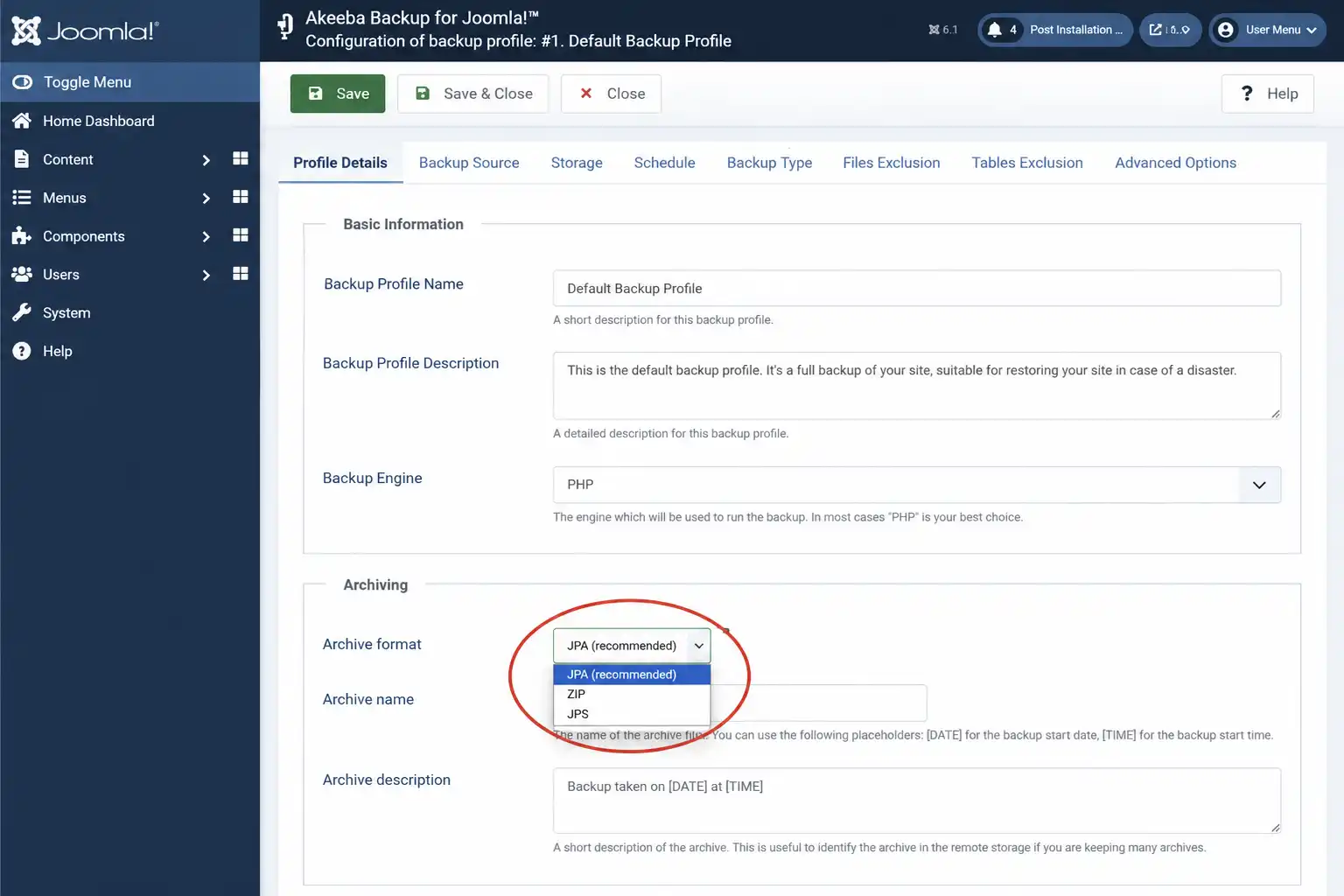
You can choose standard ZIP for maximum compatibility, the more efficient JPA format, or (Professional only) password-protected JPS archives encrypted with AES-128, useful if backups are stored somewhere you don't fully control.
PostgreSQL support (new in 2026)
As of version 10.3, Akeeba Backup supports backing up and restoring PostgreSQL-based Joomla sites in addition to MySQL/MariaDB/Percona. Cross-platform restoration isn't supported — a PostgreSQL backup must be restored to a PostgreSQL server, and the same applies to MySQL.
Automation and cloud storage (Professional)
Professional adds five different ways to trigger scheduled backups, including native CLI, Joomla's built-in Scheduled Tasks manager, and a remote API used by tools like Akeeba UNiTE. Finished archives can then be pushed automatically to over a dozen destinations, including Amazon S3, Dropbox, Google Drive, OneDrive, Microsoft Azure, Backblaze B2, and any WebDAV-compatible service.
💡 Why offsite storage matters
A backup stored on the same server it protects doesn't help if that server disappears entirely. Professional's cloud storage integrations solve this without you needing to manually download and re-upload archives.
ALICE: automated troubleshooting
If a backup fails, Akeeba Backup's built-in log analyser (ALICE) reads the failure log and suggests a likely fix based on patterns from years of real support tickets, instead of leaving you to interpret a raw PHP error log.
Pricing
Akeeba Backup Core is free with no feature time-limit. Professional is sold as an annual subscription through Paddle (Akeeba's reseller and merchant of record), and covers unlimited sites/domains under one license.
Akeeba Backup Professional — first year
€50.00
See current pricing →
Renewals drop to €22.50/year if bundled with another active subscription, or €30.00/year as a standalone renewal. Akeeba also sells bundles — for example, Backup + Admin Tools together for €75.00 the first year — which work out cheaper than subscribing to each product separately if you need both.
Pros and Cons
✅ Pros
- Core edition is genuinely free and fully functional for manual backups, not a crippled trial
- Restoration works on any Joomla-capable server, not just the original one — great for migrations
- Wide Joomla version support (currently 4.4 through 6.1) with frequent updates
- ALICE log analyser meaningfully reduces troubleshooting time on failed backups
- One Professional license covers unlimited sites/domains, not a per-site fee
⚠️ Cons
- No scheduled/automatic backups in Core — you must remember to run them manually
- No cloud storage destinations without upgrading to Professional
- Support for Core is documentation and community-only; paid support requires Professional
- Cross-database restoration (MySQL ↔ PostgreSQL) is not possible
What Real Users Report
Akeeba Backup has accumulated over 1,100 reviews on the Joomla Extensions Directory, making it one of the most-reviewed extensions in the Joomla ecosystem. Recurring themes in that feedback: users consistently describe the one-click backup and restore workflow as simple even for non-developers, and several long-time users specifically mention relying on it for site migrations and local-to-production transfers, not just disaster recovery. A smaller number of reviewers note that Core's documentation is more reference-style than step-by-step, pointing instead to Akeeba's video tutorials for walkthroughs.
Who Should Use Core vs. Professional
| Situation | Recommended edition |
|---|---|
| One personal or small business site, comfortable with manual backups | Core |
| Managing client sites or multiple domains | Professional |
| Need backups to run unattended on a schedule | Professional |
| Want backups automatically copied offsite (S3, Dropbox, etc.) | Professional |
| Site runs on PostgreSQL instead of MySQL | Either — both support PostgreSQL since v10.3 |
Frequently Asked Questions
Is Akeeba Backup really free?
Yes. Akeeba Backup Core is free and open source (GPLv2), with no feature time-limit or nag screens. Only the Professional edition, with automation and cloud storage features, requires a paid annual subscription.
What's the main difference between Core and Professional?
Core covers manual, one-click full-site backups with local storage and quota management. Professional adds scheduled/automated backups, cloud storage destinations, encrypted JPS archives, and in-component restoration.
Does Akeeba Backup support PostgreSQL?
Yes, since version 10.3 (released 2026). Both Core and Professional can back up and restore PostgreSQL-based Joomla sites, but cross-platform restoration between MySQL and PostgreSQL isn't supported.
Which Joomla versions are supported?
The current 10.3.x release line supports Joomla 4.4 through 6.1, and PHP 7.4 through 8.5. Older Akeeba Backup releases exist for older Joomla versions if needed.
How do I restore a site backed up with Akeeba Backup?
Upload the backup archive and the free Kickstart extraction script to your server, then run Kickstart through your browser to extract and restore the site. Professional adds the option to restore directly from within the component instead.
How much does Akeeba Backup Professional cost?
€50.00 for the first year as a standalone subscription, covering unlimited sites. Renewals are discounted, and bundling with Admin Tools Professional reduces the combined price further.
⚖️ Final Verdict
Akeeba Backup earns its long-standing reputation in the Joomla community by doing one job — creating a backup you can actually restore — reliably and without vendor lock-in. Core is a legitimate long-term choice for a single, low-maintenance site. The jump to Professional is really a jump in automation and peace of mind: scheduled backups and offsite cloud storage mean you stop being the single point of failure in your own backup strategy.
✅ Last verified on Akeeba Backup 10.3.x — August 2026

Stephen
CEO, Founder & Joomla Product Creator
Stephen is the CEO and Founder of Jlvextension, known for creating high-quality Joomla templates and leading the development of innovative web solutions.