
Compare
Joomla vs WordPress: Which Is Faster?
Quick Answer
Neither CMS is "faster" by design. WordPress usually feels quicker out of the box on shared hosting because its core is lighter and its caching plugin ecosystem is more mature, while Joomla's core ships with more built-in caching and server-config controls but leans more on the database for common tasks. On the same server with proper caching, both platforms can hit sub-1-second server response times — the real speed gap comes from installed extensions/plugins, template complexity, and hosting quality, not the CMS name itself.
This comparison breaks down how Joomla and WordPress actually handle a page request, where each one spends server resources, and what genuinely moves the needle on speed — so you can optimize the CMS you already run instead of chasing a "faster CMS" that doesn't really exist in isolation. It applies to current major releases of both platforms as of 2026.
Why "Which CMS Is Faster" Is the Wrong First Question
Benchmarks that pit a bare Joomla install against a bare WordPress install measure the CMS core, not the website you'll actually run. In practice, both platforms are almost never used "bare" — you add a template/theme, several extensions/plugins, and a hosting stack around them. Those three layers affect load time far more than the CMS core itself. A well-optimized Joomla site on good hosting will consistently beat a plugin-heavy WordPress site, and vice versa.
Core Architecture: How Each CMS Handles a Page Request
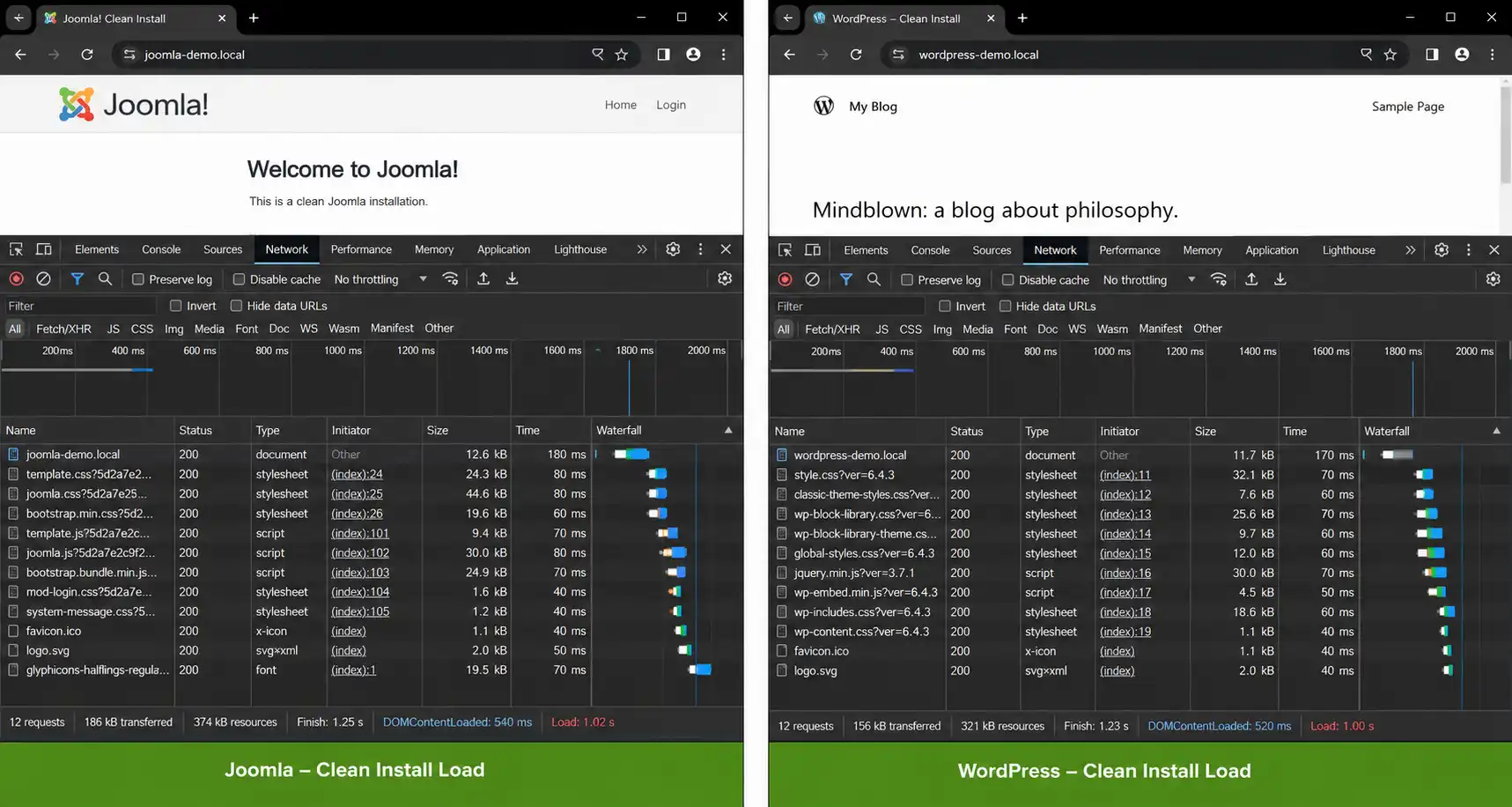
Joomla's MVC-based core routes each request through its application, plugin, and component layers before rendering, and exposes most of that pipeline's settings — caching mode, session handler, database driver — directly in Global Configuration. WordPress's core is comparatively minimal at request time; most of the behavior you'd configure in Joomla's core is instead handled by third-party plugins in WordPress (page caching, object caching, minification), which means WordPress's "out of the box" footprint is lighter, but a fully-configured WordPress stack ends up depending on plugin quality rather than core defaults.
| Factor | Joomla | WordPress |
|---|---|---|
| Caching controls | Built into core (Global Configuration: Conservative/Progressive cache, page cache plugin) | Not in core — requires a caching plugin (e.g. object/page cache plugin) |
| Default request overhead | Heavier core pipeline (MVC + plugin events) even with a simple page | Lighter core pipeline by default; overhead comes from active plugins |
| Database dependency | Core relies on DB for menu, modules, and component state on most requests | Core relies on DB for post/meta lookups; heavily reduced by full-page cache |
| Server config exposure | Session handling, DB driver, cache handler all configurable in core admin | Most of this is abstracted away or handled via plugins/hosting panel |
| Where slowdowns typically come from | Heavy extensions, unoptimized templates with many modules per page | Plugin stacking, page builders, unoptimized themes |
💬 In plain terms
Joomla gives you more speed-related dials in the core admin; WordPress gives you a lighter starting point but pushes those same dials into plugin choices. Whichever platform you're on, the dials matter more than the platform name.
Caching: What Each CMS Gives You Out of the Box
Joomla includes page caching and system caching directly in Global Configuration, so a fresh install can have basic caching enabled without any third-party extension. WordPress does not ship with page caching in core — you need a caching plugin, or hosting-level caching (many managed WordPress hosts bake this in at the server level, which is part of why "good WordPress hosting" specifically markets speed as a feature).
This means the real-world caching gap depends heavily on your hosting choice: on a managed host with server-level caching, WordPress caching can outperform a default Joomla setup; on generic shared hosting with no server-level caching, Joomla's built-in cache can outperform a WordPress install with no caching plugin configured.
Extensions vs. Plugins: The Real Speed Killer
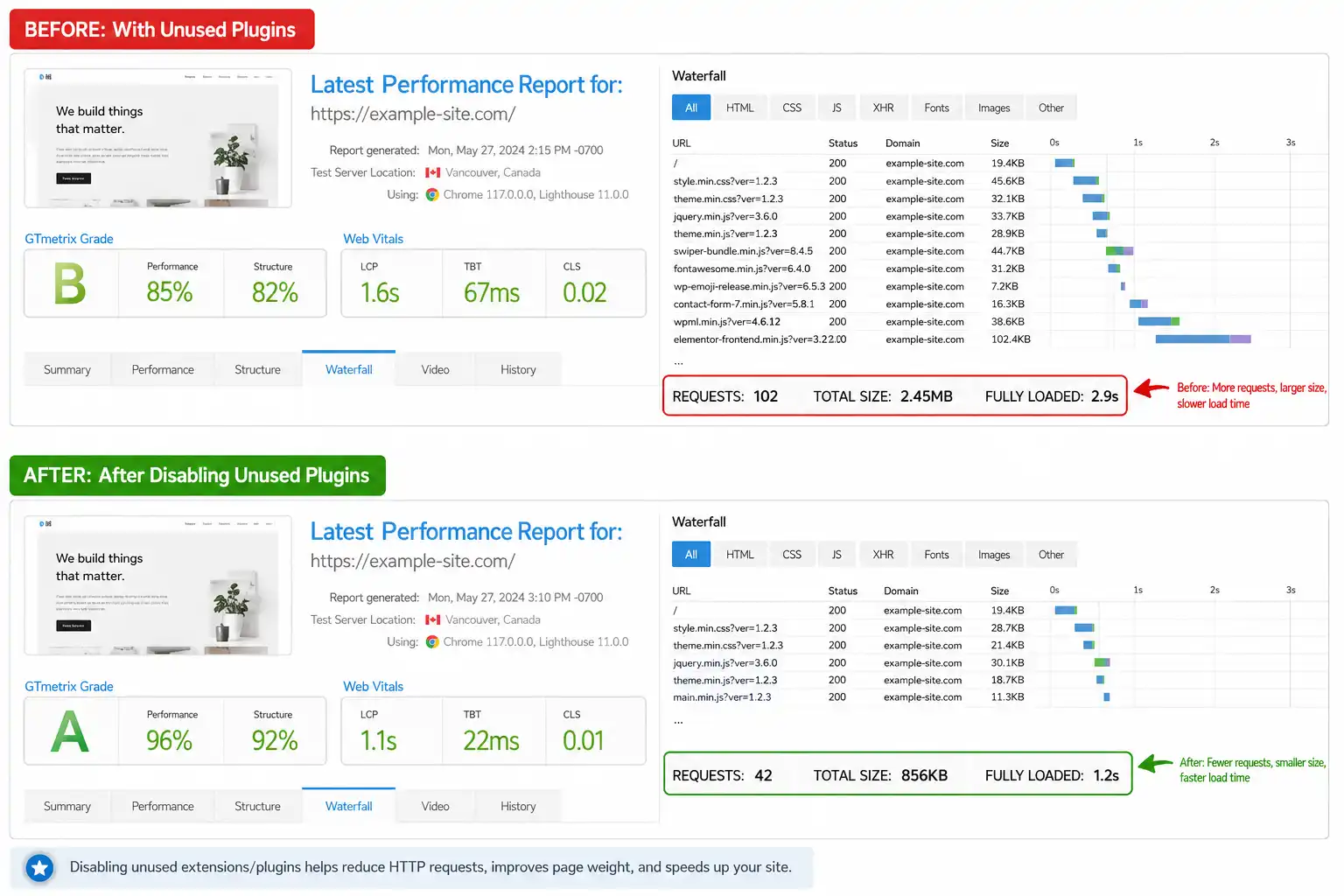
Both ecosystems have the same failure mode: stacking too many third-party add-ons that each add their own database queries, CSS/JS files, and hooks into the page load. Joomla's extension directory is smaller than WordPress's plugin directory, which in practice means Joomla site owners tend to install fewer, more purpose-built extensions, while WordPress's enormous plugin catalog makes it easy to accumulate overlapping plugins (three SEO tools, two caching plugins, a page builder plus its own asset loader) that quietly compound load time.
Page builders on either platform (heavy visual builders in WordPress, or module-heavy templates in Joomla) are consistently the biggest self-inflicted performance cost, because they generate more markup, more inline CSS, and more render-blocking assets than hand-coded templates.
Hosting Requirements for Each CMS
| Requirement | Joomla | WordPress |
|---|---|---|
| PHP version support | Follows current PHP release cycle; check your Joomla version's minimum PHP requirement in official docs | Follows current PHP release cycle; check your WordPress version's minimum PHP requirement in official docs |
| Database | MySQL/MariaDB, or PostgreSQL/MS SQL depending on version | MySQL/MariaDB |
| Recommended for busy sites | OPcache enabled, object cache (Redis/Memcached) for high-traffic sites | OPcache enabled, object cache (Redis/Memcached), plus a page cache plugin or host-level cache |
How to Benchmark Your Own Site, Whichever CMS You Run
- Test with caching fully disabled first, to isolate raw CMS + extension overhead from caching wins.
- Re-test with caching enabled (core cache for Joomla, or your caching plugin/host cache for WordPress) to see the realistic number visitors will get.
- Use a cold, uncached request for Time to First Byte — this is the number search engines and AI crawlers effectively "feel" first.
- Test from a location close to your actual audience, not just your own network.
⚠️ Common mistake
Comparing a cached WordPress page against an uncached Joomla page (or vice versa) and calling it a CMS speed test. That's a caching-configuration test, not a platform test.
Real-World Optimization Checklist
✅ For Joomla sites
- Enable Progressive Caching in Global Configuration
- Audit modules per page — each module is a template render + potential DB query
- Use a lightweight, well-coded template rather than a heavy module-driven layout
- Enable Joomla's native gzip compression and gzip-friendly cache headers
⚠️ For WordPress sites
- Install one caching plugin, not several overlapping ones
- Audit active plugins for duplicated functionality (e.g. two SEO plugins)
- Avoid stacking a heavy page builder on top of an already heavy theme
- Use a theme built for performance rather than a general-purpose multipurpose theme
Frequently Asked Questions
Is Joomla faster than WordPress by default?
Not inherently. Joomla's core ships with built-in page/system caching, which can make an unoptimized default install feel faster on basic hosting with no server-level cache. WordPress's lighter core plus a good caching plugin or managed-host caching can match or beat that.
Does WordPress need more plugins than Joomla to reach the same speed?
WordPress needs at least a caching plugin to match what Joomla includes in core, but WordPress's ecosystem also has more single-purpose lightweight plugins, so the total plugin count needed can go either way depending on your build.
What slows down a Joomla site the most?
Too many modules and heavy component extensions rendered on the same page, each adding its own database queries and assets — more so than the CMS core itself.
What slows down a WordPress site the most?
Plugin stacking and heavy page builders are the most common causes, followed by unoptimized images and a lack of any caching layer.
Can I run a fast e-commerce or membership site on either platform?
Yes, but both need extra attention to caching strategy for logged-in/dynamic pages, since full-page caching doesn't apply the same way to personalized content on either CMS.
Final Verdict
There's no universal winner on raw speed — the deciding factor is almost always hosting quality, caching configuration, and extension/plugin discipline, not the CMS itself. If you're already invested in one platform's ecosystem (templates, extensions/plugins, workflow), the faster path to a genuinely fast site is optimizing what you have rather than migrating for speed alone.
✅ Last verified against current Joomla and WordPress major releases — July 2026

Thanh Le
Joomla Specialist & Technical Writer
Thanh Le is a Joomla expert and technical writer at Jlvextension.com, known for creating in-depth tutorials, extension reviews, and optimization guides. His work focuses on helping developers and webs

How to Override a Module Layout in Joomla 6 (Update-Safe Method)
Beginner
⏱ 5 min

Joomla Security Checklist: 12 Steps to Harden Your Site in 2026
Beginner
⏱ 11 min