
Tutorial
How to Improve Core Web Vitals in Joomla
Affiliate disclosure
This post may contain affiliate links to MonsterONE and Envato. If you purchase through them, we may earn a commission at no extra cost to you. We only recommend tools we have tested ourselves.
Quick Answer
To improve Core Web Vitals in Joomla, run PHP 8.3 or newer, enable Joomla's built-in Page Cache and Gzip compression, add a dedicated caching extension for static-page delivery, compress and lazy-load images to fix LCP, defer non-critical JavaScript to fix INP, and add explicit width/height to every image to fix CLS. Re-check results in Search Console after the 28-day CrUX window, since Google grades on rolling real-user data, not a single test.
| What you'll need | Notes |
|---|---|
| Joomla admin access | Super User or a role with access to Global Configuration, Extensions, and Templates |
| Joomla 5.4+ or 6.x | Joomla 4 stopped receiving updates in October 2025; upgrade first if you're still on it |
| PHP 8.3 or newer | Ask your host to confirm the active version — this alone can cut server response time noticeably |
| Google Search Console access | Needed to read your site's real Core Web Vitals report (field data, not lab data) |
| PageSpeed Insights | Free tool for diagnosing which of the three metrics is failing on a specific URL |
| Others | JCH Optimize, Speed Cache, and JotCache are common options — used interchangeably as examples below unless you tell us which one to feature with an affiliate link |
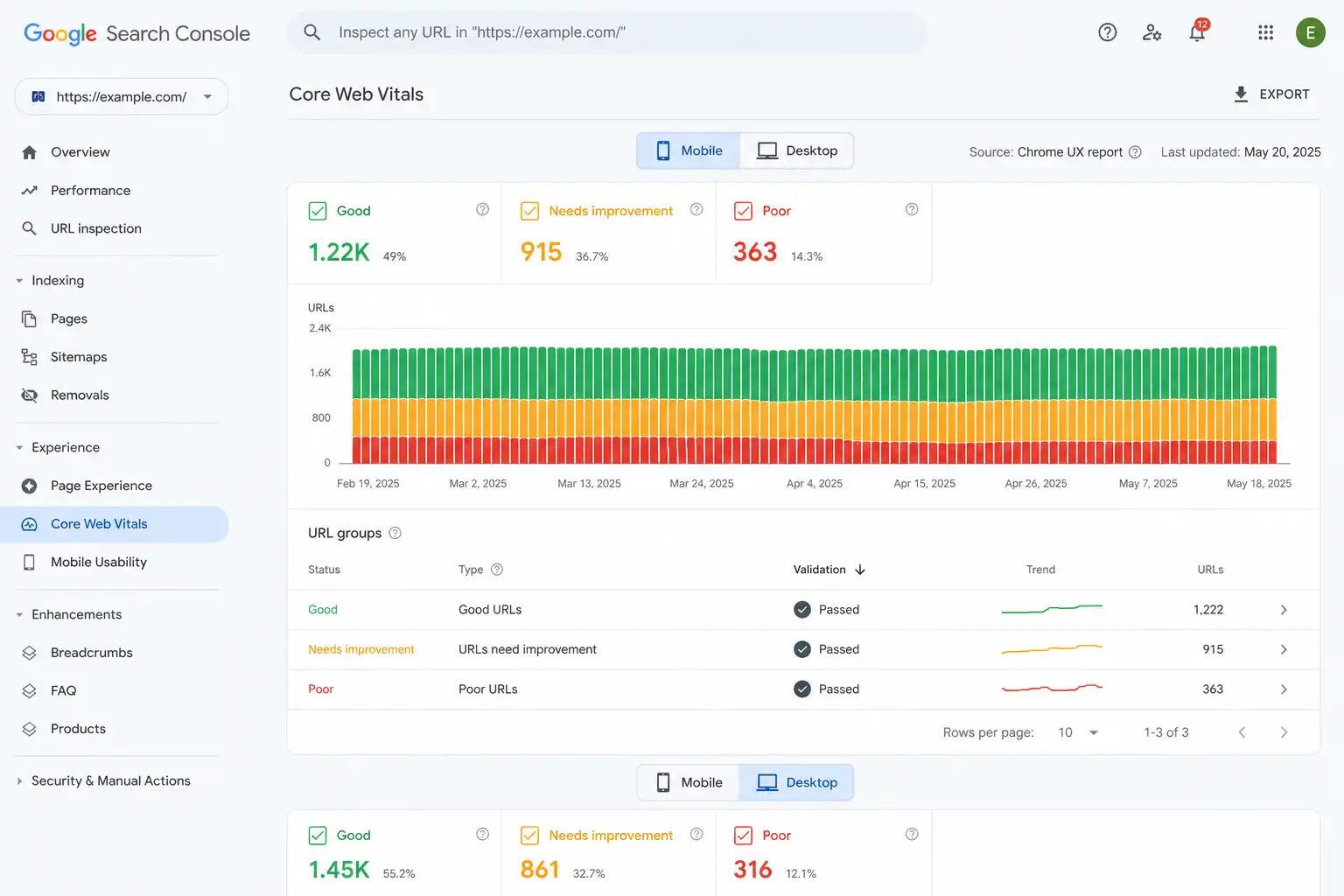
Core Web Vitals are the three metrics Google uses to grade real-world page experience: Largest Contentful Paint (LCP) for loading speed, Interaction to Next Paint (INP) for responsiveness, and Cumulative Layout Shift (CLS) for visual stability. This guide walks through fixing all three on a Joomla site — from server-level settings to caching, images, and JavaScript — using Joomla 5.4/6.x as the reference version and PHP 8.3+ as the baseline server requirement.
Step 1: Check Your Current Core Web Vitals Score
Before changing anything, find out which metric is actually failing. Fixing LCP when your real problem is INP wastes time.
- Open Google Search Console and go to the Core Web Vitals report — this shows real visitor (CrUX) data at the 75th percentile, grouped by mobile and desktop.
- Run your homepage and your most-visited article through PageSpeed Insights to see the current LCP, INP, and CLS values plus specific fix suggestions.
- Note the "poor" metric first. The general priority order is: fix whatever is in the poor band, then INP (hardest to fix), then LCP (highest commercial impact), then CLS (usually the easiest).
⚠️ Don't judge results too quickly
Search Console's Core Web Vitals data is a rolling 28-day window of real visitor traffic. After you deploy a fix, wait several weeks before checking whether it worked — a green PageSpeed Insights score in your browser today does not mean CrUX will reflect it tomorrow.
Step 2: Confirm You're on a Supported PHP and Joomla Version
Server-side response time affects every single Core Web Vitals metric, especially LCP. This is the fix with the best effort-to-impact ratio and it requires no code changes.
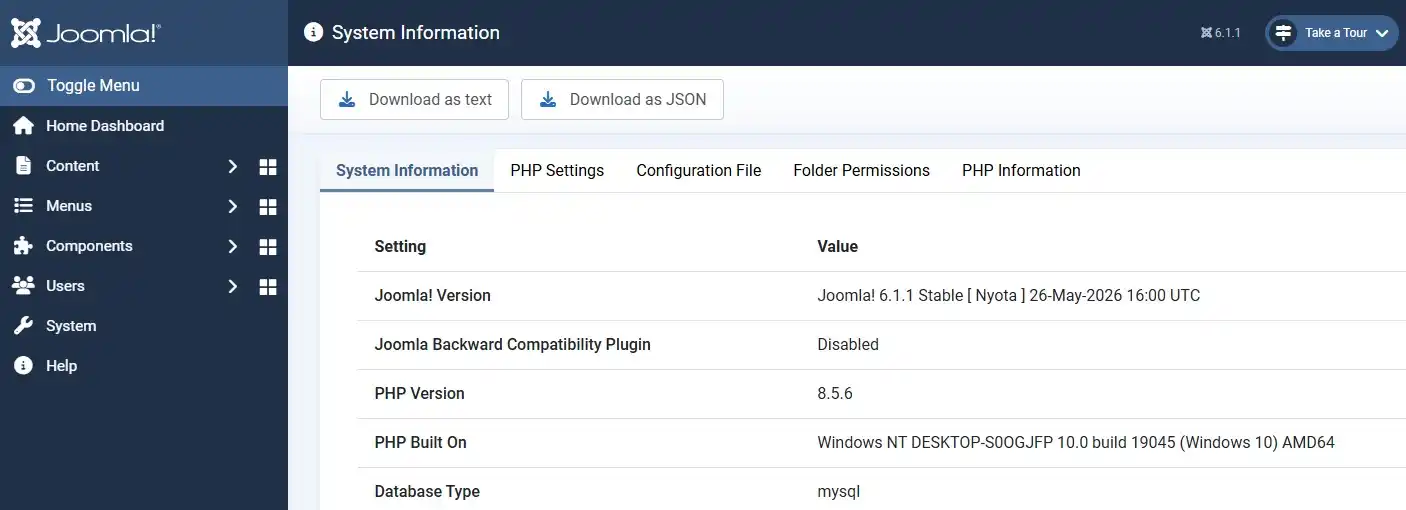
- Go to System → System Information → PHP Information in the Joomla admin, or check with your host directly.
- Joomla 6.x requires PHP 8.3+ and MySQL 8.0.13+ or MariaDB 10.4+. Joomla 4 no longer receives security updates as of October 2025 — if you're still on it, plan an upgrade to 5.4 or 6.x.
- Ask your host to move you to the latest stable PHP release your Joomla version supports. Older PHP builds are frequently the single biggest hidden bottleneck on shared hosting.
Step 3: Turn On Joomla's Built-In Page Cache and Gzip Compression
Joomla ships with a native cache and compression system that is disabled by default on most installs. This is the fastest zero-cost win.
- Go to System → Global Configuration → System tab and set Caching to "ON – Conservative caching" (Progressive caching can break some dynamic modules, so start conservative).
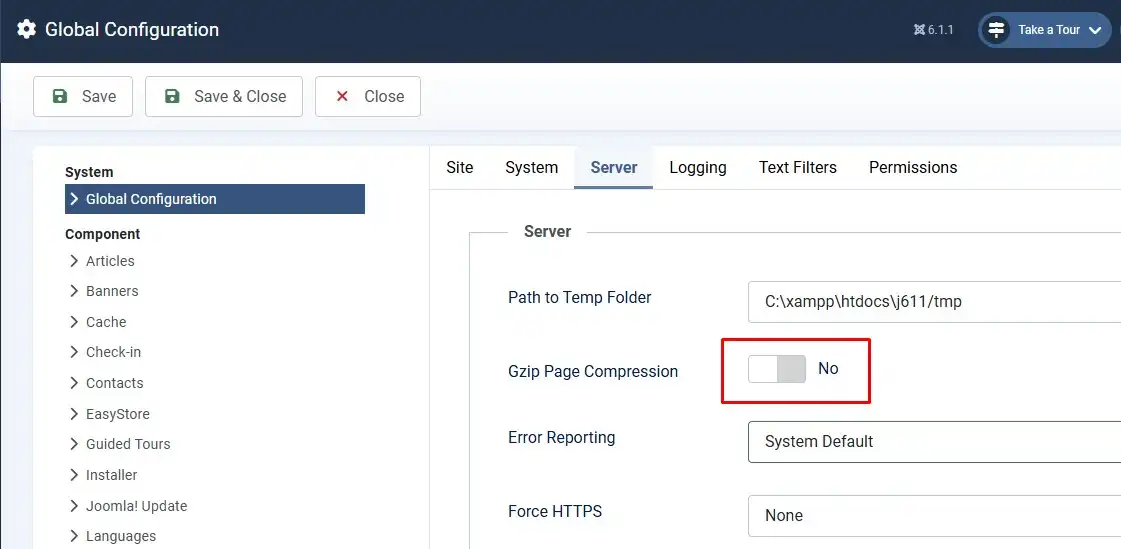
- Go to System → Global Configuration → Server tab and enable "Gzip Page Compression".
- Go to System → Manage → Plugins, search for "System – Page Cache", enable it, and turn on its "Use Browser Caching" option.
Step 4: Add a Dedicated Caching Extension for Deeper Optimization
Joomla's native cache helps, but it doesn't handle image compression, minification, or per-user dynamic caching well on its own. A dedicated extension covers the gap.
- Install a caching extension such as JCH Optimize, Speed Cache, or JotCache from the Joomla Extensions Directory, or browse performance extensions bundled in a MonsterONE subscription — a single membership gives access to hundreds of Joomla extensions and templates instead of buying each one separately.
- Configure static-page caching per user session so logged-in users and guests don't share cached HTML incorrectly.
- Enable the extension's minification tools for CSS/JS and its image compression module if included — image weight is typically the largest single contributor to page size.
Step 5: Fix LCP — Compress Images and Preload the Hero Image
LCP measures how fast the largest visible element (usually a hero image or heading) appears. Image weight is the most common cause of a failing LCP on content sites.
- Compress every image used above the fold before uploading — aim for a visually lossless reduction, not maximum compression at the cost of visible artifacts.
- Convert large photos to WebP or AVIF where your template and browser support allows it.
- Add a
<link rel="preload">tag for the hero/LCP image so the browser fetches it immediately instead of discovering it late in the render tree — most caching/optimization extensions expose this as a checkbox rather than requiring manual code. - Avoid lazy-loading the hero image itself; lazy loading is for below-the-fold images only. Lazy-loading the LCP image delays it and makes the score worse.
Step 6: Fix INP — Reduce and Defer JavaScript
INP measures how quickly the page responds to a tap or click, including everything that happens after the click, not just the initial delay. This is the metric most sites fail in 2026.
- Audit installed modules and plugins for ones you don't actually use — every active script adds to the main-thread work the browser has to clear before it can respond to input.
- Defer non-critical JavaScript (chat widgets, popups, tracking scripts) so it loads after the page is interactive, not during initial render.
- Minify and combine JS files through your caching extension's minification tool rather than loading each script separately.
- Avoid installing multiple caching/optimization extensions at once — overlapping minification and cache layers commonly cause JavaScript conflicts that hurt INP instead of helping it.
Step 7: Fix CLS — Reserve Space for Every Image and Dynamic Block
CLS measures how much visible content jumps around while the page loads. It's usually the easiest of the three metrics to fix.
- Add explicit
widthandheightattributes to every image, video, and iframe in your article content and template modules. - Reserve fixed space for ad slots, related-post widgets, or any module that loads asynchronously, so it doesn't push content down once it finishes loading.
- Set
font-display: swapfor any custom web fonts your template loads, and make sure the fallback font has a similar size/spacing to avoid a visible text reflow.
Step 8: Serve Through HTTP/2 or HTTP/3 and Consider a CDN
- Confirm with your host whether your server supports HTTP/2 or HTTP/3 (QUIC) — both allow the browser to load multiple resources over a single connection instead of queueing them, which helps LCP.
- For sites with visitors spread across multiple regions, a CDN in front of Joomla's static assets (images, CSS, JS) reduces the physical distance data has to travel, which lowers LCP further.
Step 9: Re-Test and Monitor Over Time
- Re-run PageSpeed Insights immediately after each change to confirm the lab score moved in the right direction.
- Wait for the Search Console Core Web Vitals report to refresh (up to 28 days) before treating a fix as confirmed at the real-user level.
- Re-check monthly — new content, new modules, or a template update can quietly regress a metric that was previously passing.
Frequently Asked Questions
What is a good Core Web Vitals score for a Joomla site in 2026?
A page passes when at least 75% of real visits hit LCP under 2.5 seconds, INP under 200 milliseconds, and CLS under 0.1. These thresholds are the same for every CMS, including Joomla — there's no Joomla-specific target.
Does Joomla's built-in cache improve Core Web Vitals on its own?
It helps server response time, which supports LCP, but it doesn't fix image weight, unused JavaScript, or missing image dimensions. Native caching is a starting point, not a complete fix.
Which Joomla version should I run for the best performance?
Joomla 5.4 or 6.x, running on PHP 8.3 or newer. Joomla 4 stopped receiving security updates in October 2025, so staying on it adds risk without a performance benefit.
How long until I see Core Web Vitals improve after making changes?
Search Console updates on a rolling 28-day window of real user data, so allow at least a few weeks after deploying before judging whether a fix worked.
Do I need a paid caching extension if native Joomla caching is already on?
Not strictly, but native caching alone rarely fixes INP or image-driven LCP issues. A dedicated extension typically adds minification and image compression that Joomla's core cache doesn't include.
Can switching Joomla templates affect Core Web Vitals?
Yes — a template with heavy, unused CSS/JS or non-optimized image handling can hurt all three metrics regardless of how well caching is configured elsewhere.
🧯 Common Mistakes to Avoid
- Enabling Progressive caching immediately. It can break forms, sessions, or personalized modules. Start with Conservative caching and test.
- Lazy-loading the hero image. This delays your LCP element instead of speeding it up — lazy loading belongs on below-the-fold images only.
- Stacking multiple caching/optimization extensions. Overlapping minification often causes JavaScript conflicts that regress INP instead of improving it.
- Judging a fix from a single PageSpeed Insights run. That's lab data. Google grades your site on real-user CrUX data over a rolling 28-day window.
- Over-compressing images to the point of visible quality loss. The goal is smaller file size at a visually lossless level, not the smallest possible file.
- Forgetting explicit image dimensions on template modules, not just article body images — module-loaded images are a common overlooked CLS source.
✅ Last verified on Joomla 6.1 / PHP 8.3+ — July 2026

Stephen
CEO, Founder & Joomla Product Creator
Stephen is the CEO and Founder of Jlvextension, known for creating high-quality Joomla templates and leading the development of innovative web solutions.

How to Override a Module Layout in Joomla 6 (Update-Safe Method)
Beginner
⏱ 5 min

Joomla Security Checklist: 12 Steps to Harden Your Site in 2026
Beginner
⏱ 11 min