Tutorial
How to Build an Effective Internal Linking Structure in Joomla
⚡ Quick Answer
Build an effective internal linking structure in Joomla by organizing content into a shallow category/menu hierarchy (max 3 clicks from the homepage), then combining Joomla's native tools — the Related Articles module, Tags, and Smart Search — with manual contextual links inside the article body. Audit the result regularly with a broken-link checker so no article becomes an orphan page.
| What you'll need | Details |
|---|---|
| Joomla admin access | Super User or a user group with Article and Menu edit permissions |
| Joomla version | Steps and screenshots below match Joomla 5.4.x / 6.1.x admin UI (current stable releases as of mid-2026); menu labels are nearly identical back to Joomla 4.x |
| Existing content | At least 10–15 published articles, organized (even loosely) into categories — internal linking needs content to connect |
| Comfort level | Basic familiarity with Article Manager, Category Manager, and Menu Manager |
| Recommended before starting | A full site backup, in case you install a new plugin in Step 5 |
Most Joomla sites accumulate articles faster than they organize them. The result is a stack of disconnected pages — Google and AI answer engines alike struggle to understand which pages matter most, and visitors hit dead ends instead of related content. This guide walks through building an internal linking structure specifically inside Joomla's admin panel: category and menu setup, the native Related Articles module, manual contextual links, an optional automation plugin, and an ongoing audit routine.
🖼️
[SCREENSHOT NEEDED]
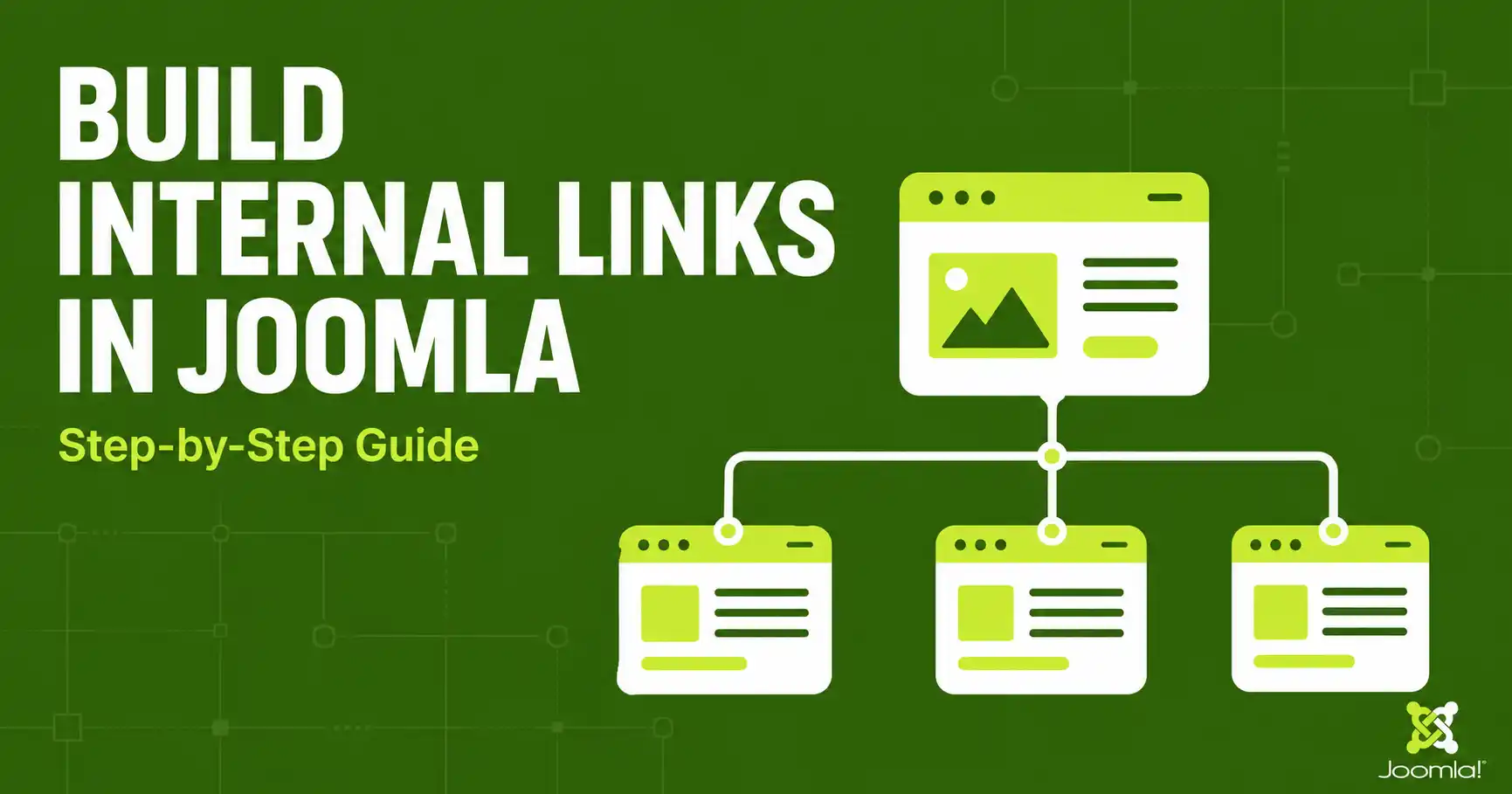
Hero image: a simplified site-map diagram showing a Joomla homepage linking down to 3–4 top category pages, which link down to individual articles — illustrating the "pyramid" structure described in Step 1.
Step 1: Map Your Current Content and Category Structure
Before adding a single link, find out what you're working with. Go to Content → Categories and Content → Articles in the Joomla admin, and list out every category along with roughly how many published articles sit inside it. You're looking for two problems: categories that are too broad (a "Blog" category with 200 unrelated articles) and orphan articles — pages with no other article on the site linking to them.
Why this matters for AI citations
Answer engines like ChatGPT, Perplexity, and Google AI Overview lean on link relationships to figure out how topics connect on your site. A flat pile of unlinked articles gives them nothing to reason about — a clear hierarchy does.
Step 2: Design a Shallow Category and Menu Hierarchy
Rebuild (or confirm) your structure around a pyramid: homepage → a small number of top-level category pages (pillar topics) → individual articles (supporting content). Keep every important article within 3 clicks of the homepage. In Joomla, this typically means:
- 3–6 top-level categories in Content → Categories, each representing one core topic your blog covers (e.g., "Joomla Templates," "WordPress Plugins," "Site Speed").
- A matching top-level menu item for each pillar category under Menus → [Your Menu] → Add New Menu Item, using the "Category Blog" or "Category List" menu item type so the category itself becomes a linkable hub page.
- Sub-categories only where a pillar topic genuinely splits into distinct sub-groups — avoid nesting more than one level deep if you can help it.
🖼️
[SCREENSHOT NEEDED]
Joomla admin, Content → Categories list view, showing a small set of top-level categories with clear, topic-based names (not "Uncategorised" or "Blog").
Step 3: Turn On the Related Articles Module
Joomla ships with a core module, mod_related_items ("Related Articles"), that automatically lists other articles sharing the same meta keywords as the one being viewed. To enable it, go to Content → Site Modules → New → Related Articles, assign it to a module position your template renders inside or near the article view (commonly a sidebar or "article-related" position), and publish it.
For this to work, open each article's Publishing tab and fill in the Meta Keywords field with 2–4 terms shared by genuinely related articles (e.g., joomla, seo, internal linking). Meta keywords no longer affect Google rankings directly, but Joomla still uses this field internally to power this module — it's one of the few legitimate remaining uses for it.
🖼️
[SCREENSHOT NEEDED]
Article editor, Publishing tab, with the Meta Keywords field filled in and highlighted with an arrow or box.
Step 4: Add Contextual Links Manually Inside Article Body Text
The Related Articles module is automatic but generic — it doesn't understand context. The links that carry the most weight, for both readers and AI systems, are the ones placed inside a sentence where they genuinely help the reader go deeper on a specific point. While editing an article in TinyMCE, select the relevant phrase, click the Link icon, and search for the target article by title instead of pasting a raw URL.
- Use descriptive, varied anchor text — never the same exact-match phrase for every link to a given page.
- Link only when the destination genuinely helps the reader at that point in the sentence; skip it if not.
- Aim for roughly 2–5 contextual links per 1,000 words of body content, per current internal linking guidance for 2026.
⚠️ Avoid link stuffing
Piling in links "just because a keyword matches" reads as manipulative to both search engines and AI crawlers. Ask: does this specific link help this specific reader right now? If not, leave it out.
Step 5: Automate Keyword-Based Linking With a Plugin (Optional)
Manually linking hundreds of older articles is slow. If your site has a large back catalog, a keyword-based auto-linking plugin can help close the gap. As one example, Content – InterLinked is a free Joomla 5 plugin that scans article body text for keywords defined in the meta keywords field and automatically inserts links to matching articles, with configurable tooltips and CSS classes.
[CẦN BẠN XÁC NHẬN: xác nhận tên plugin cụ thể bạn muốn giới thiệu/khuyến nghị trong bài — Content-InterLinked chỉ là một ví dụ tìm được, cần xác nhận trước khi công khai đề xuất, vì đây không phải extension do JLV Blog tự kiểm thử dài hạn.]
- Install it from the Joomla admin under System → Manage → Install, then enable it under System → Manage → Plugins.
- Any plugin like this respects existing manual links, so running it after Step 4 won't create duplicate or conflicting links.
- Re-run or let it re-index periodically as new articles reuse the same meta keywords, so the link web stays current.
🖼️
[SCREENSHOT NEEDED]
Joomla admin, Plugins list filtered to show the auto-linking plugin enabled, with its configuration panel open showing keyword and CSS class settings.
Step 6: Strengthen Discovery With Tags, Breadcrumbs, and Smart Search
Three more core Joomla features reinforce your link structure without any extra plugin:
- Tags (Components → Tags): assign topic tags to articles, then add a Tagged Items module so any tag becomes a hub page linking to everything sharing that tag — useful for cross-category connections a category hierarchy alone can't express.
- Breadcrumbs module: shows the category path back to the homepage on every page, reinforcing the hierarchy you built in Step 2 for both users and crawlers.
- Smart Search (com_finder, under Components → Smart Search): Joomla's core search engine actively indexes content as it's published and can power a "Content Map" or related-search module, giving visitors another path to connected articles beyond manual links.
Step 7: Audit and Maintain Your Internal Link Structure
An internal linking structure decays as content is added, moved, or unpublished. Set a recurring reminder (monthly for active blogs, quarterly for smaller sites) to:
- Run a broken-link checker extension or an external crawler to find dead internal links after any URL or menu change.
- Check Google Search Console's Links report for pages with very few or zero internal links pointing to them (orphan pages).
- Re-check meta keywords on new articles so the Related Articles module keeps surfacing genuinely related content.
❓ FAQ
Does Joomla have a built-in tool for internal linking?
Yes. The core Related Articles module (mod_related_items) automatically links articles sharing the same meta keywords, and Tags plus Smart Search add further automatic discovery paths — no third-party extension is required to get started.
How many internal links should one Joomla article have?
There's no fixed rule, but current guidance suggests roughly 2–5 contextual links per 1,000 words, placed only where they genuinely help the reader, plus whatever the Related Articles module and menu/breadcrumb navigation add automatically.
Do meta keywords still matter for SEO in Joomla?
Not for Google rankings — Google has ignored the meta keywords tag since 2009. In Joomla specifically, the field still has a functional use: it's what the Related Articles module reads to find related content.
Do I need a plugin to auto-link Joomla articles?
No, it's optional. Manual contextual links plus the core Related Articles module cover most sites. An auto-linking plugin mainly saves time on large back catalogs where manually linking every older article isn't practical.
Why does internal linking matter for AI tools like ChatGPT or Google AI Overview?
AI answer engines use link relationships to understand how topics on a site connect to each other. A clear, logical internal link structure makes it easier for them to identify and cite the most relevant page for a given question.
Will restructuring my Joomla menu break existing links?
It can, if menu changes alter article URLs (Joomla's default URLs are often tied to menu item structure with SEF URLs on). Always run a broken-link check immediately after any menu or category reorganization.
🧯 Common Mistakes to Avoid
- Relying only on the Related Articles module. It's automatic but generic — it can't replace links placed deliberately inside a sentence where they add real context.
- Leaving orphan pages. Any article with zero internal links pointing to it is effectively invisible to both crawlers and readers navigating your site.
- Over-optimizing anchor text. Repeating the exact same keyword-stuffed anchor for every link to a page looks manipulative to search engines and AI systems alike.
- Building a flat, single-level category structure. Dumping everything into one or two categories removes the hierarchy that both users and AI systems rely on to understand topic relationships.
- Skipping the audit after a redesign. Changing menu items, categories, or URLs without re-checking internal links is the single most common cause of a sudden spike in broken links.
✅ Last verified on Joomla 5.4.7 / 6.1.2 — July 2026

Thanh Le
Joomla Specialist & Technical Writer
Thanh Le is a Joomla expert and technical writer at Jlvextension.com, known for creating in-depth tutorials, extension reviews, and optimization guides. His work focuses on helping developers and webs

