
Tutorial
How to Speed Up a Joomla Website for Better SEO

Quick Answer
Speed up a Joomla site by updating to Joomla 5.4.7 or 6.1.2 on PHP 8.4, enabling Joomla's built-in Page Cache and Gzip compression, compressing images to WebP, combining CSS/JS with an optimizer like JCH Optimize, and serving static assets through a CDN. Most well-configured Joomla sites can reach an LCP under 2.5 seconds and pass Core Web Vitals within a day of work.
| What you'll need | Notes |
|---|---|
| Super User access to Joomla admin | Needed for Global Configuration and plugin settings |
| Joomla 5.4.x or 6.1.x | Older 4.x/3.x releases miss recent performance fixes |
| PHP 8.3+ (8.4 recommended) | Joomla 6 minimum is PHP 8.3; Joomla 5 also runs well on 8.4 |
| Full site backup | Take one before touching cache/compression settings |
| PageSpeed Insights or Search Console access | To measure before/after |
This guide covers Joomla 5.x and Joomla 6.x. Menu labels are nearly identical between the two; where they differ, both are noted. It focuses on changes you can make without touching server config files, plus what to ask your host for when you can't.
Affiliate disclosure
Some links in this article, including links to MonsterONE, are affiliate links. If you subscribe through them, we may earn a commission at no extra cost to you. We only recommend tools used or evaluated for this guide.
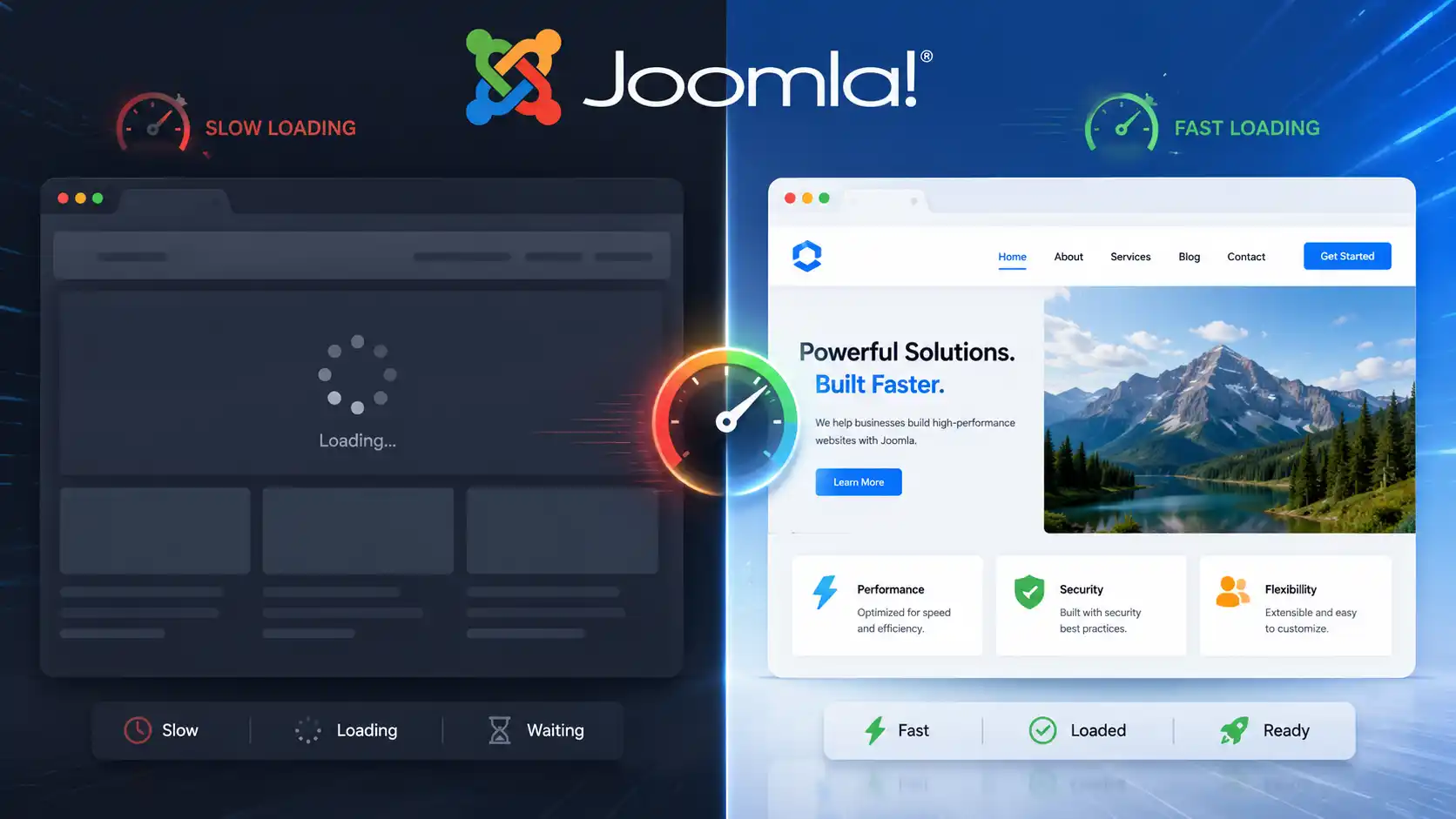
Step 1: Measure Your Current Speed Baseline
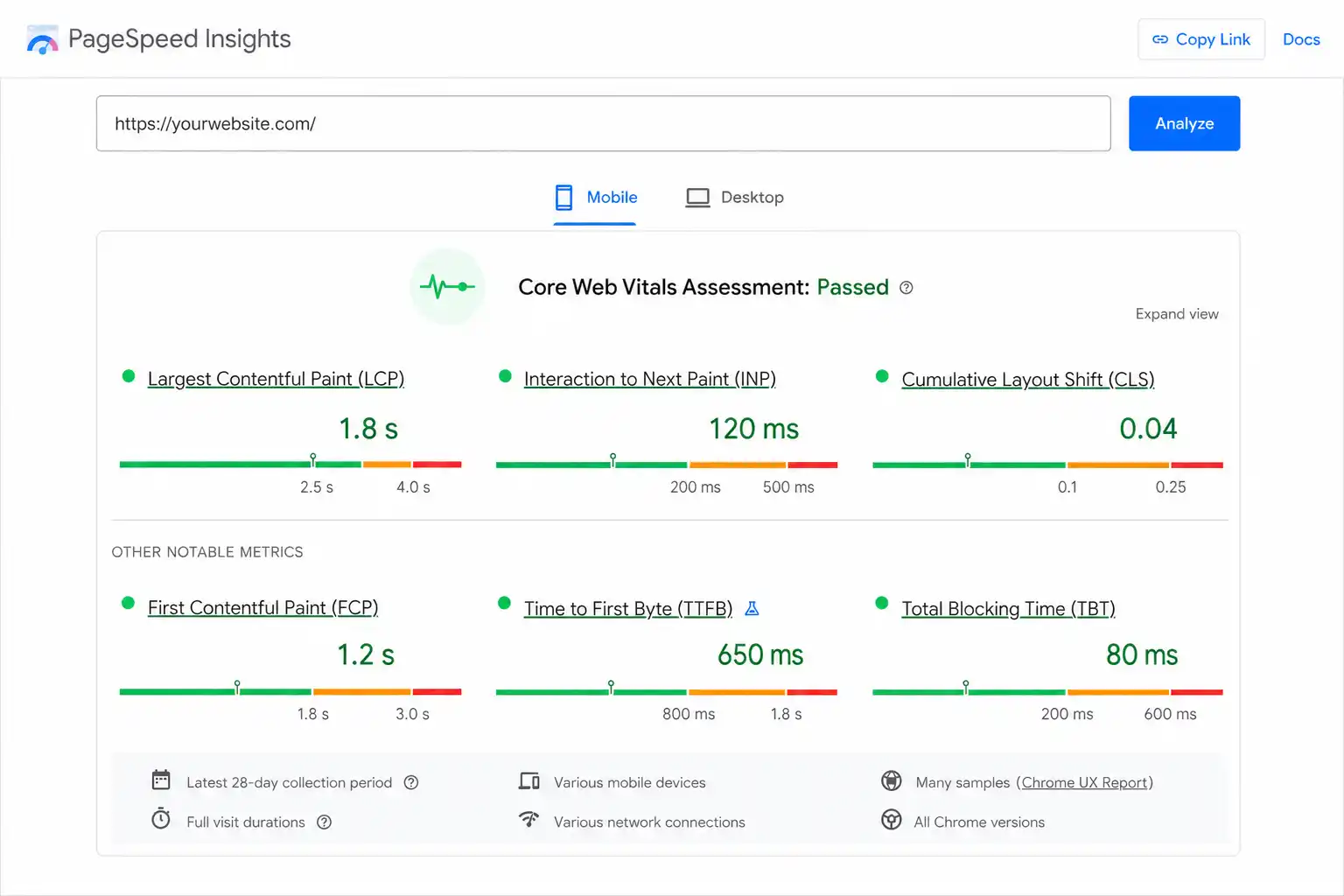
Before changing anything, record where you stand. Open Google PageSpeed Insights, enter your homepage and one typical content page, and note the three Core Web Vitals: Largest Contentful Paint (LCP), Interaction to Next Paint (INP), and Cumulative Layout Shift (CLS). In 2026, "good" means LCP under 2.5 seconds, INP under 200 milliseconds, and CLS under 0.1 — measured at the 75th percentile of real visitors over a rolling 28-day window in the Chrome User Experience Report (CrUX), not a single lab test.
Why this step matters
Google grades field data, not your own Lighthouse run. A page that "feels fast" on your office fiber connection can still fail Core Web Vitals for the 25% of visitors on a mid-range phone with patchy mobile signal. Fix whichever metric is in the "poor" band first.
Step 2: Update Joomla and PHP
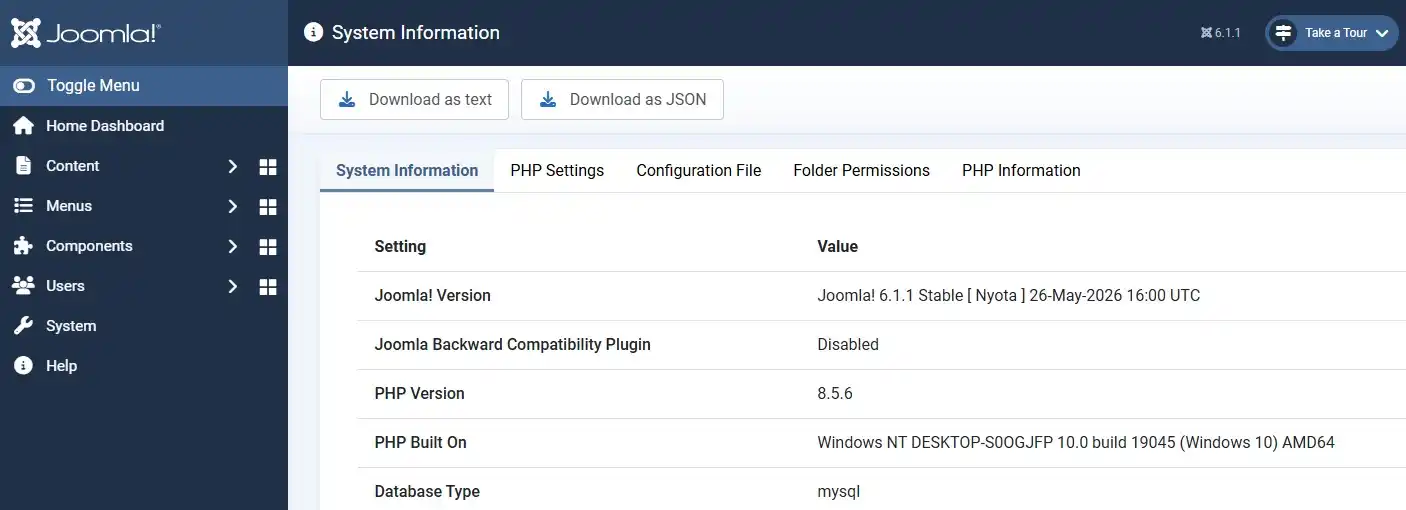
Joomla's current stable releases are Joomla 6.1.2 and Joomla 5.4.7 (both security/bugfix releases). Each new minor version ships performance and code-quality fixes, and staying on an outdated release means missing them. Under Joomla 6, the official minimum is PHP 8.3.0 with PHP 8.4+ recommended; MySQL 8.0.13 or MariaDB 10.4.0 is the minimum database, with MySQL 8.4+/MariaDB 12.0+ recommended. Joomla 5 runs comfortably on PHP 8.1–8.4.
To check your current versions: go to System → System Information in the admin panel. If your host still has you on PHP 7.x or 8.0, ask them to bump it — most managed Joomla hosts let you switch PHP versions from a control panel dropdown with no code changes needed.
Step 3: Choose a Lightweight, Well-Coded Template
Template choice sets your performance ceiling before any plugin can help. A template loaded with unused sliders, icon font libraries, and animation scripts adds render-blocking CSS/JS that no cache setting can undo. Two options:
- Audit your current template: disable unused module positions, custom fields, and third-party sliders/carousels you don't actually use.
- Switch to a template built for speed. If you're already using or considering a MonsterONE subscription for templates and extensions, prioritize templates from that bundle that are documented as lightweight/Core Web Vitals-friendly rather than the most feature-dense option.
Step 4: Enable Joomla's Built-In Page Cache
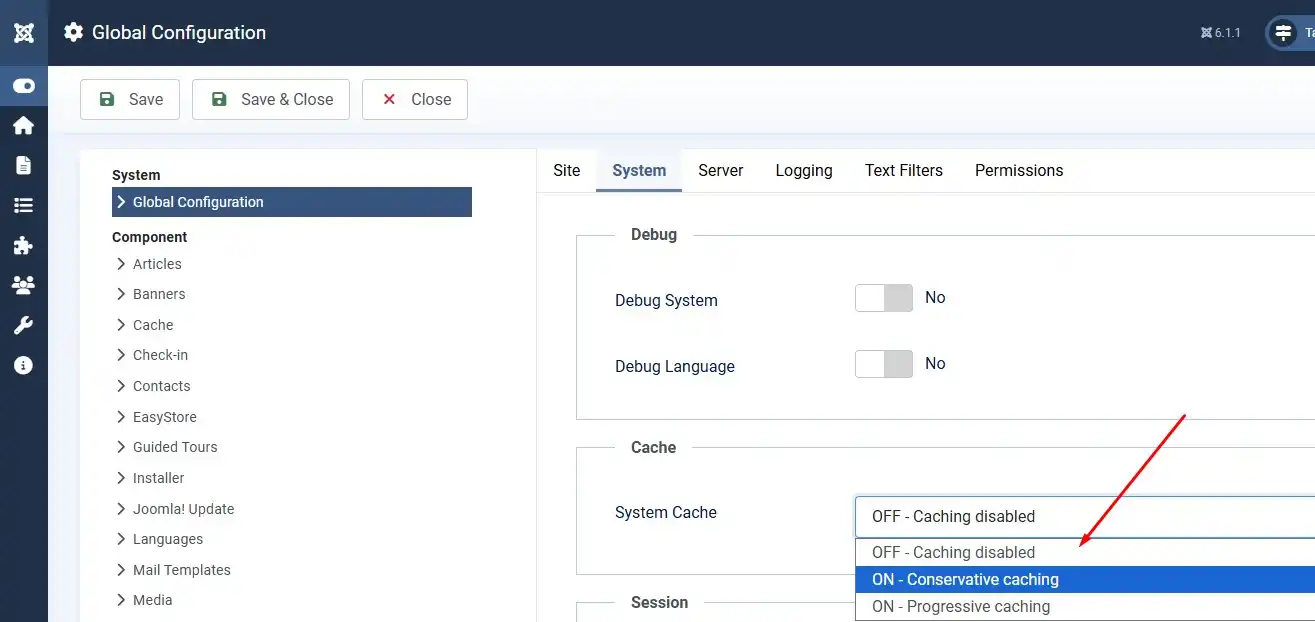
Joomla ships with caching you're probably not using. Go to System → Global Configuration → System tab and set Caching to "ON - Progressive Caching" (or "ON - Conservative Caching" if your extensions are older/less cache-friendly). Then go to System → Manage → Plugins, search for "Page Cache," and enable the System - Page Cache plugin.
Test after enabling
Page Cache can serve stale content to logged-in users or break components that render per-user data (carts, dashboards). Test checkout flows and any logged-in-only pages immediately after enabling it, on both Joomla 5 and Joomla 6.
Step 5: Turn On Gzip/Brotli Compression
Go to System → Global Configuration → Server tab and set Gzip Page Compression to "Yes." This compresses HTML, CSS, and JS before sending them to the browser, cutting transfer size substantially. If your host supports Brotli at the server level (check with them or your hosting control panel), enable that too — it typically compresses better than Gzip for text assets.
Step 6: Compress and Convert Images
Images are usually the single biggest contributor to a slow LCP. For every image on the page:
- Convert to WebP (or AVIF where supported) instead of large JPEG/PNG files.
- Resize to the actual display dimensions — don't upload a 3000px-wide photo into a 600px-wide content column.
- Lazy-load images below the fold; do not lazy-load the image that becomes your LCP element (usually the hero image), since lazy-loading it delays LCP instead of improving it.
- Set explicit
widthandheightattributes on every image to prevent layout shift (CLS).
Extensions like JCH Optimize include an image optimization module that can batch-convert and resize images directly from the Joomla media library.
Step 7: Combine and Minify CSS/JavaScript
[CẦN BẠN XÁC NHẬN: bạn đang dùng extension nào để combine/minify CSS-JS, hay chỉ dùng Joomla Web Asset Manager mặc định? Phần dưới viết dựa trên JCH Optimize làm ví dụ phổ biến nhất, sửa lại nếu site dùng công cụ khác.]
JCH Optimize (version 9.3.0, released June 2026, compatible with Joomla 4, 5, and 6) combines and minifies CSS/JS files, inlines critical CSS, and defers non-critical scripts to reduce render-blocking resources. Its newer "Smart Combine" bundling feature groups assets more intelligently than combining everything into one file, which can otherwise create a single giant blocking download.
Combine carefully
Aggressively combining every script into one file can break components that expect scripts to load in a specific order. After enabling combine/minify, click through your homepage, a product/article page, and any contact form or checkout page to confirm nothing broke.
Step 8: Add a CDN
A CDN serves your images, CSS, and JS from a server geographically close to each visitor instead of a single origin server. This mainly helps LCP for visitors far from your host's data center. Most CDN providers (including Cloudflare, which JCH Optimize 9.3.0 integrates with directly through its Cloudflare Mode Switcher) offer a free or low-cost tier that works with Joomla without code changes — point your DNS through the CDN and enable caching for static file types.
Step 9: Clean Up the Database and Unused Extensions
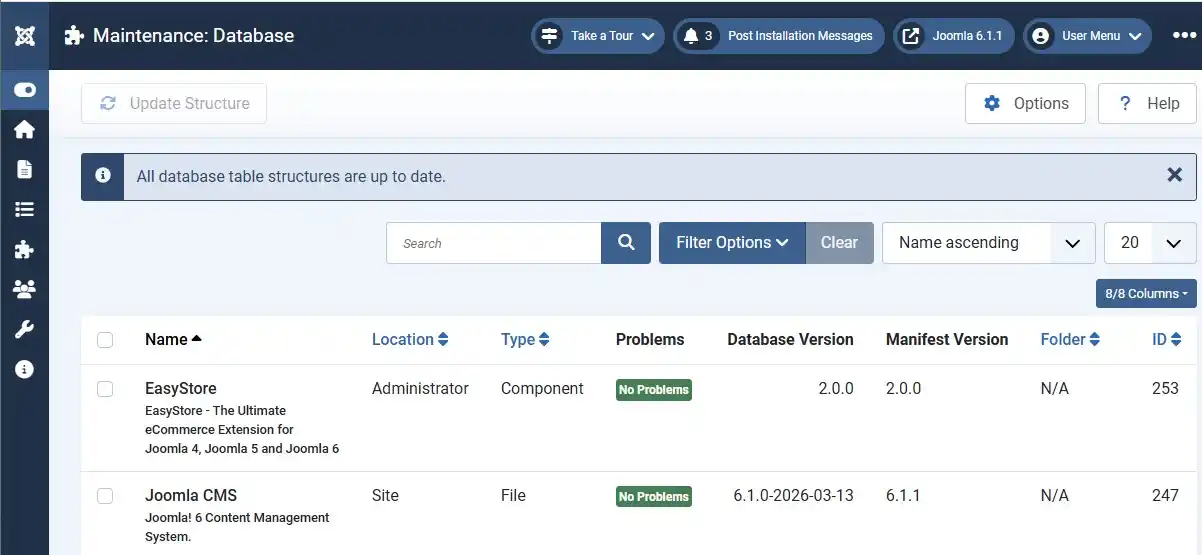
Go to System → Maintenance → Database in Joomla and run "Optimize Database." Then audit installed extensions: uninstall (not just disable) anything you no longer use, since disabled extensions can still leave leftover database tables and, in some cases, still load assets. Fewer active extensions means fewer HTTP requests and fewer things that can slow down every page load.
Step 10: Re-Test and Monitor
Re-run PageSpeed Insights on the same pages you tested in Step 1. Lab scores update immediately, but your real Core Web Vitals pass/fail status in Search Console won't update until Google's 28-day CrUX window rolls over. Check back in 3–4 weeks before concluding a change didn't work.
❓ Frequently Asked Questions
How fast should a Joomla site load in 2026?
Aim for Largest Contentful Paint under 2.5 seconds, Interaction to Next Paint under 200 milliseconds, and Cumulative Layout Shift under 0.1, each passing for at least 75% of real visitors in Google's CrUX data.
Is Joomla slower than WordPress by default?
Not inherently. Both are PHP CMSs with similar bottlenecks: template bloat, unoptimized images, and missing caching. A well-configured Joomla site and a well-configured WordPress site can perform similarly; an unoptimized site on either platform will be slow.
Does upgrading from Joomla 5 to Joomla 6 make my site faster on its own?
Upgrading brings code and security improvements, but it won't fix a bloated template, unoptimized images, or disabled caching. Treat the upgrade as one input to speed, not a complete fix by itself.
Do I still need a plugin like JCH Optimize if I already enabled Joomla's built-in Page Cache?
Yes, they solve different problems. Page Cache avoids rebuilding pages from the database; JCH Optimize (or similar) reduces the number and size of CSS/JS files sent to the browser. Most fast Joomla sites use both.
Will compressing my images hurt their quality?
Modern lossless/near-lossless WebP conversion at reasonable quality settings (80–85%) is usually visually indistinguishable from the original while cutting file size significantly. Always spot-check a few converted images before rolling out site-wide.
🧯 Common Mistakes to Avoid
- Enabling aggressive caching without testing logged-in flows. Page Cache can serve stale or wrong content to logged-in users if you skip this check.
- Combining every script into one file blindly. This can break scripts that depend on load order — test key pages after enabling combine/minify.
- Lazy-loading the hero/LCP image. This delays the exact element Google measures for LCP.
- Judging results from a single PageSpeed Insights run. Lab data can vary run to run; real ranking impact depends on the 28-day CrUX field data window.
- Using product-listing images from Envato/ThemeForest as "before/after" proof. Use your own screenshots — stock listing images don't reflect your actual site's performance.
- Leaving unused extensions installed "just in case." Each one adds potential HTTP requests and database tables even when disabled.
✅ Last verified on Joomla 6.1.2 / Joomla 5.4.7 — July 2026

Thanh Le
Joomla Specialist & Technical Writer
Thanh Le is a Joomla expert and technical writer at Jlvextension.com, known for creating in-depth tutorials, extension reviews, and optimization guides. His work focuses on helping developers and webs

How to Override a Module Layout in Joomla 6 (Update-Safe Method)
Beginner
⏱ 5 min

Joomla Security Checklist: 12 Steps to Harden Your Site in 2026
Beginner
⏱ 11 min